
The State Selection Board (SSB), Department of Higher Education, Government of Odisha has officially released the online application form for 883 vacancies of Junior Assistant and Junior Clerk posts across various government institutions in Odisha under Advertisement No. 01/2026. The online apply link became active on 11 March 2026 at 2:30 PM and the last date to submit the form and pay the fee is 13 April 2026 at 11:45 PM.
The vacancies are spread across State Public Universities, Government Colleges, NCC Units, BSE Odisha, OUHS, School & Mass Education Department, and Non-Government Aided Colleges. Eligible candidates who are permanent residents of Odisha and hold a Bachelor’s degree with basic computer knowledge can apply online at ssbodisha.site.
SSB Odisha Junior Assistant Recruitment 2026 – Overview
| Organization | State Selection Board (SSB), Department of Higher Education, Govt. of Odisha |
| Advertisement No. | 01/2026 |
| Post Names | Junior Assistant & Junior Clerk |
| Total Vacancies | 883 Posts |
| Departments | State Public Universities, Govt. Colleges, NCC Units, OUHS, BSE Odisha, School & Mass Education Dept., Non-Govt. Aided Colleges |
| Pay Scale | ₹19,900 – ₹63,200 per month (Level-4, 7th Pay Commission) |
| Qualification | Bachelor’s Degree from a recognized university + Basic Computer Skills |
| Selection Process | Written Test (OMR) + Computer Skill Test |
| Negative Marking | 0.50 marks deducted per wrong answer |
| Application Opens | 11 March 2026 (2:30 PM) |
| Last Date to Apply & Pay | 13 April 2026 (11:45 PM) |
| Application Mode | Online only – ssbodisha.site |
| Official Website | ssbodisha.ac.in |
Eligibility Criteria
| Educational Qualification | Bachelor’s Degree from a recognized university. Must possess basic computer skills. |
| Odia Language | Must have passed minimum 7th class exam in Odia (as per application requirement) |
| Domicile | Resident / permanent native of Odisha state |
| Age Limit (Upper) | 42 years (age relaxation as per Odisha Govt. norms for SC/ST/OBC/PwD/Ex-Servicemen) |
| Minimum Age | 21 years |
| Application Fee | ₹500/- (General/SEBC) | ₹200/- (SC/ST/PwD) |
Documents & Images Required for Application
JPG/PNG | 30–100 KB
JPG/PNG | 30–100 KB
JPG/PNG | 30–100 KB
| Document | Purpose |
|---|---|
| Aadhaar Number (12-digit) | Mandatory for identity verification in application form |
| 10th Certificate / Marksheet | Date of Birth proof and academic qualification |
| 12th Certificate / Marksheet | Educational qualification details |
| Graduation Certificate / Marksheet | Essential qualification – marks, year, university details required |
| Computer Knowledge Certificate | Institution name, qualification, year of passing |
| Category Certificate | SC/ST/SEBC/EWS/PwD certificate if applicable |
| Ex-Serviceman Certificate | If applicable |
| Sportsperson Certificate | If applicable |
| Bank Account Details | For fee refund eligibility — IFSC, account number, bank & branch name required |
| Active Mobile No. & Email ID | For OTP verification, login and all future communication |
Step-by-Step Online Application Process – SSB Odisha Junior Assistant 2026
The online application consists of 4 steps followed by Payment. Follow each step carefully as per the official instructions:
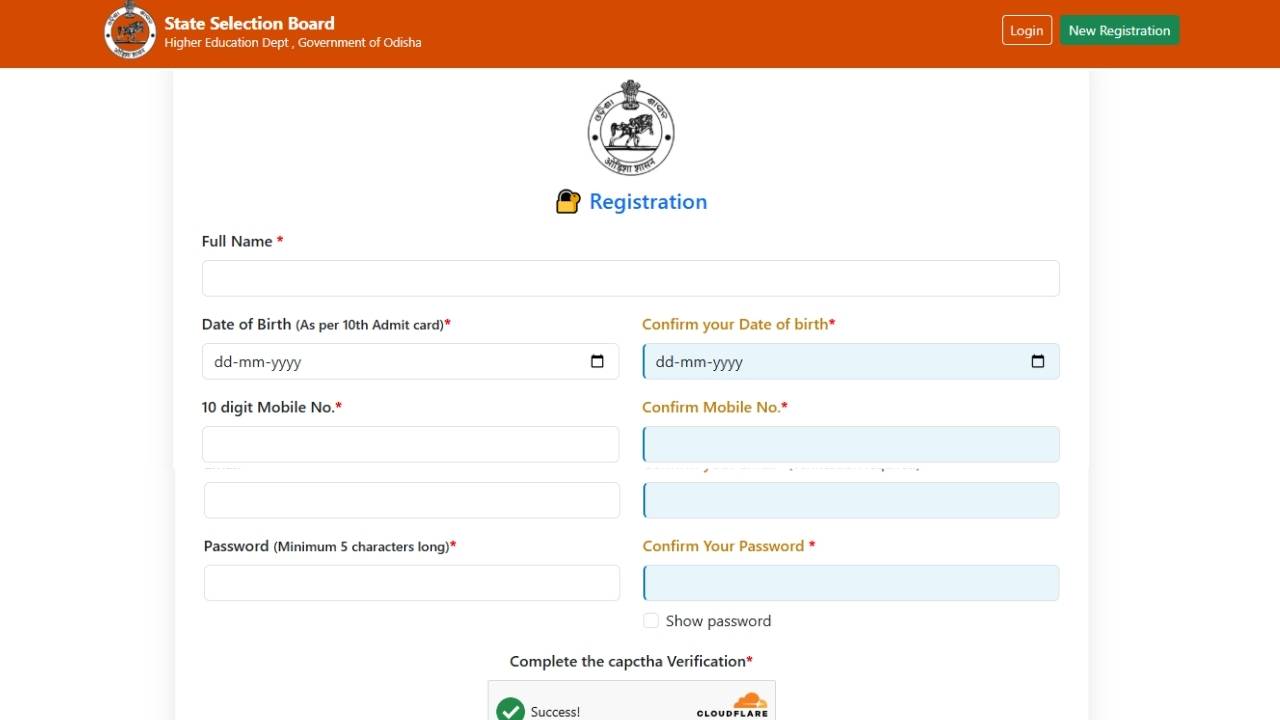
Before filling the application form, you must first register on the portal. Go to ssbodisha.site/public/advertisement.php and click the Registration link.
- Full Name
- Date of Birth (as per 10th Admit Card)
- 10-digit valid Mobile Number (this will be used for all communication)
- Active Email ID (email verification required to activate account)
- Password (minimum 5 characters)
- Complete the CAPTCHA verification
⚠️ Important: Each candidate can register only once using a unique Email ID and Mobile Number. After registration, verify your email to activate the account. If you forget your password, use the “Forgot Password” link on the login page.
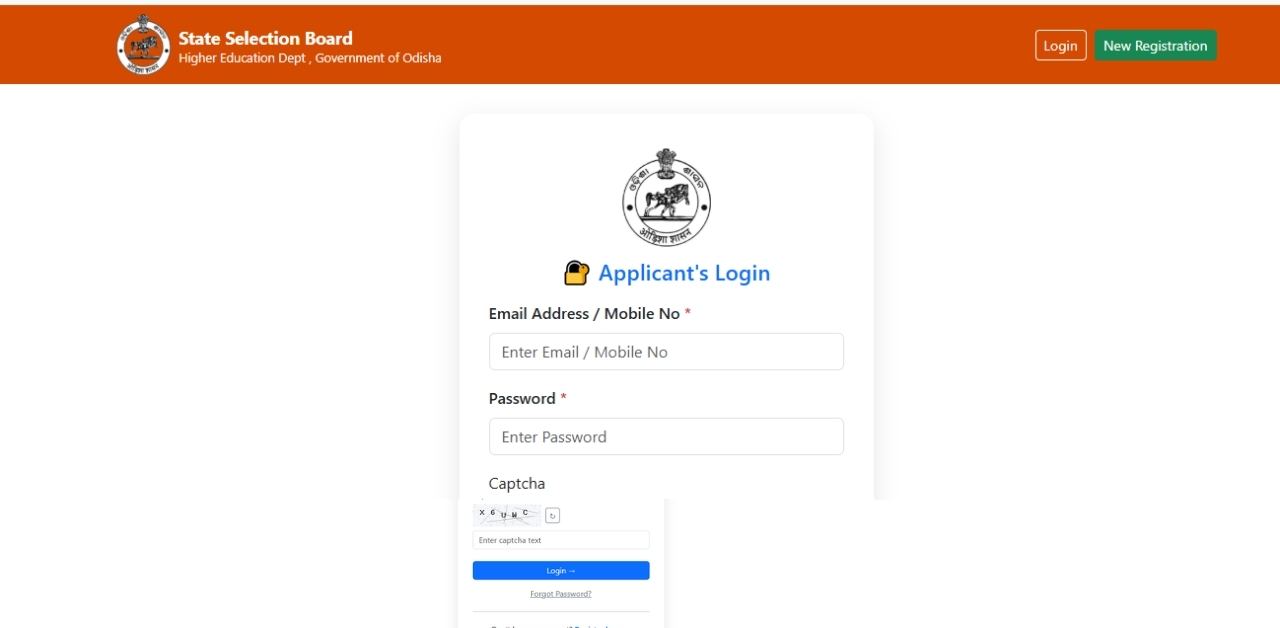
After successful registration and email verification, log in using your registered Email ID / Mobile Number and Password. You will reach your Applicant Dashboard.
Click on the “Click to Apply” button to begin your new application. Note that each account is limited to 1 application only. The online form consists of 4 steps followed by payment.
Enter all personal details carefully as per your official documents. Fields marked (*) are mandatory.
- Applicant’s Full Name, Father’s Name, Mother’s Name
- Date of Birth (as per 10th Certificate)
- 12-digit Aadhaar Number
- Gender, Marital Status, Nationality, Religion
- Resident of Odisha? (Yes / No)
- Category (UR / SC / ST / SEBC / EWS)
- Whether Ex-Serviceman, Sportsperson, PwD (select correct disability type & percentage if applicable)
- Whether employee of Odisha Government
Note: The system automatically calculates age based on Date of Birth entered.
- Active Email ID (must be available for communication)
- Active Mobile Number (must be available for communication)
- House No. / Apartment / Plot No., Village, Post Office, City, District, State, PIN Code
- If same as Permanent Address, click “Same as Permanent Address”
- Otherwise enter correspondence address manually
After completing all fields, click Save & Next.
Arrange your preferences for institutions / departments carefully using the ↑ (Up) and ↓ (Down) buttons. Preference 1 will be treated as highest priority. Preferences cannot be changed after final submission.
Select your preferred examination zone from the dropdown list.
Select Yes / No for: “Whether passed minimum 7th class exam in Odia?”
- 10th / Equivalent: Board/Council name, Total Marks, Marks Secured, Percentage, Year of Passing
- 12th / Equivalent: Board/Council name, Total Marks, Marks Secured, Percentage, Year of Passing
- Graduation / Equivalent: University name, Institution name, Total Marks, Marks Secured, Percentage, Year of Passing (convert CGPA to % before entering)
- Computer Knowledge: Institution/University name, Qualification as per Certificate, Year of Passing
After completing all details, click Save & Next.
You must answer Yes / No honestly for each of the following:
- Whether any FIR has been lodged / registered against you?
- Whether any prosecution is pending in any Court of Law?
- Whether any Chargesheet has been filed against you?
- Has any Court Case been filed against you?
- Whether you have been convicted by any court in any offence?
- Whether any disciplinary action has been initiated by Government / Semi-Government Organizations against you?
⚠️ Warning: Providing false information will lead to rejection of candidature.
- Passport Size Colour Photo — Recommended size: 390 × 470 px
- Signature — Recommended size: 455 × 210 px
- Left Thumb Impression — Recommended size: 455 × 210 px
⚠️ Do NOT click Refresh or the Back button during image upload — this can corrupt your uploaded image file.
After uploading all documents, click Save & Next.
This page displays your complete application for review before final submission. Carefully verify:
- Personal Details and Address
- Post Preferences and Examination Zone
- Educational Qualifications
- Criminal Declaration answers
- Uploaded Photo, Signature and Thumb Impression
Read the Declaration carefully, tick the required declaration checkboxes, and confirm all information is correct.
Click “Confirm & Submit” for final submission — or click Back if any correction is required.
⚠️ Important: After clicking Confirm & Submit, the application CANNOT be edited again.
After final submission of the form, you will be returned to your Dashboard. Click “Pay Now” to proceed to payment.
- Applicant Name & Name of Account Holder
- Bank IFSC Code (11-digit)
- Name of Bank and Branch
- Bank Account Number (enter and confirm)
Click Proceed to Payment — you will be redirected to the SBI Collect Payment Gateway. Complete payment using available options (Net Banking / Debit Card / Credit Card / UPI).
| Category | Fee |
|---|---|
| SC / ST / PwD Candidates | ₹200/- |
| UR / SEBC (OBC) Candidates | ₹500/- |
⚠️ Payment Tips: Do not refresh or close the browser during payment. Save or print the payment receipt. Payment status may take up to 3 working days to reflect in your dashboard — do not repeat the payment if it was already successful.
System Requirements for Filling the Application
| Preferred Device | Desktop or Laptop (mobile not recommended) |
| Internet | Stable broadband or Wi-Fi connection |
| Browsers | Latest Google Chrome or Latest Mozilla Firefox |
| Browser Settings | JavaScript and Pop-ups must be enabled |
| Image Format | JPG / PNG only |
| Image Size | Between 30KB and 100KB (each) |
Final Checklist Before Submitting
- Personal details match official certificates and documents
- Correct category selected (UR / SC / ST / SEBC / EWS / PwD)
- Post preference order reviewed carefully (cannot be changed after submission)
- Educational details (10th, 12th, Graduation, Computer) verified and match official documents
- CGPA converted to percentage before entering
- Photo, Signature and Left Thumb Impression uploaded in correct format and size
- Criminal declaration answered correctly
- Declaration checkbox ticked
- Bank account details entered correctly for fee refund eligibility
- Application fee payment completed successfully
- Payment receipt saved / printed for future reference
Selection Process
| Stage | Details |
|---|---|
| Stage 1 – Written Test (OMR Based) | Objective type written examination. Negative marking of 0.50 marks per wrong answer |
| Stage 2 – Computer Skill Test | Practical computer skill test for shortlisted candidates from written exam |
| Stage 3 – Document Verification | Original document verification for finally selected candidates |
Frequently Asked Questions (FAQs)
📄 Official Notification PDF: Download Here – ssbodisha.ac.in
📋 Application Instructions PDF: Download Here